GreenBTC redesigned: a new block wall and smoother greening
Explore the new layout, mobile navigation and in-page lucky draws, plus USDC purchases on Arc.
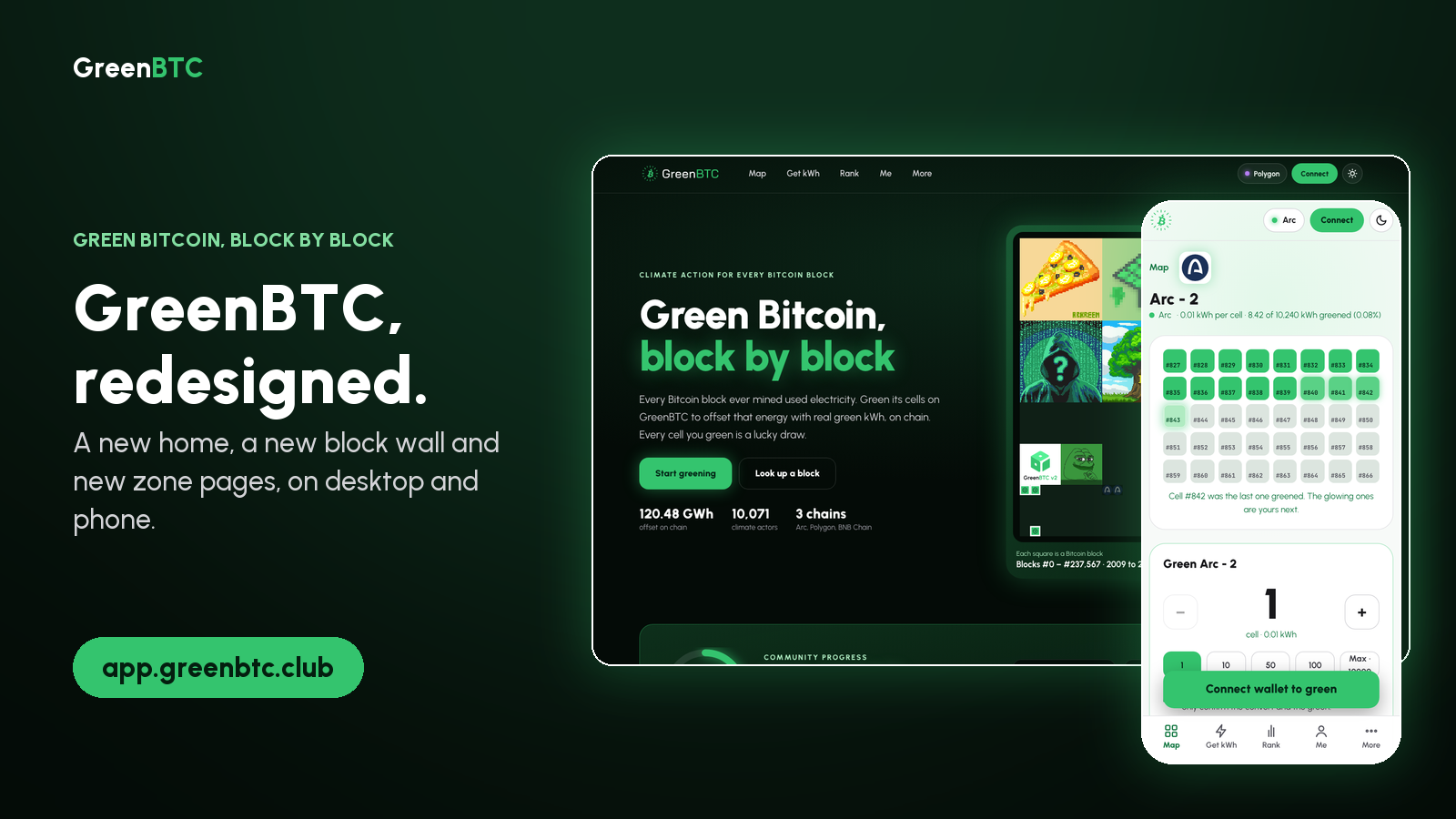
GreenBTC's redesigned app is live, with a new layout from the home page to the zone where you green your next cell. On GreenBTC, you use renewable-energy kWh tokens to green cells in zones of Bitcoin blocks, and every cell is a lucky draw. The redesign makes each step easier to find and quicker to do, on desktop and on your phone.
What's new at a glance
- A new home page that introduces greening and walks you to your first cell.
- A rebuilt block wall: tap any logo or block to see what it is and where to green next.
- New zone pages with the lucky draw right on the page and fewer repeat approvals.
- A mobile layout with bottom tabs, in day and night mode.
- Get kWh on one page for every chain, and on Arc you can now pay with USDC.
- New layouts for Rank, Me, Dashboard, Campaign and Green Nodes.
- A 90-second walkthrough video and a step-by-step guide for first-timers.
A new home
The new home page introduces greening, then walks you through the three steps to your first cell and the chain options for your wallet. You will also find live numbers for energy offset and climate actors, and the partner projects greening their own zones.
The block wall, rebuilt
The Full block map shows Bitcoin's first 237,568 blocks, one square each, including partner artwork and zones that are already fully greened. Zones shows the zones grouped by chain. Filter by chain, or turn on "Only zones you can green" to highlight open zones and dim the rest.
Tap anything on the wall and a card tells you what it is. An open zone takes you straight to greening. A finished zone links to its page so you can see what it became. Partner artwork points you to the nearest zones that still have cells left. You can also look up any block by height, or jump to moments like Pizza Day and the 4th halving.
Block vs. cell: A square on the wall is a Bitcoin block. A cell is a share of a zone's energy, and greening cells is how a zone fills up.
New zone pages
Each zone now has a page built around greening. On it you can:
- See the zone's progress.
- Preview the next cells (the glowing ones are yours next).
- Choose how many to green with one tap.
- Check the lucky-draw table and today's pool.
- Watch your draw open right on the page.
Wallet confirmations. On Arc, converting ART and greening can take up to four wallet confirmations the first time. Steps you don't need are skipped. On other chains, greening with kWh already in your wallet takes up to two. On Arc - 2, keep "Allow up to 1 kWh" ticked to cut repeat approvals while the allowance lasts.
Short of kWh? The zone page shows how much you need and links to Get kWh. Top up there, then tap "Back to green" to return to your zone.
Built for your phone, day and night
The mobile layout adds bottom tabs for Map, Get kWh, Rank, Me and More, keeps the green button on zone pages in reach right above them, and opens wall cards from the bottom of the screen. Day or night mode follows your system by default, or you can choose one from the header.
Get kWh, one page for every chain
kWh is what greens cells, and each chain keeps its own balance. The new Get kWh page shows your balances and payment options across Arc, Polygon and BNB Chain. Select a chain and token to see the rate and the gas token.
New on Arc: besides converting the ART your miner earns, you can buy kWh from the available stock with USDC, at 0.01 USDC per kWh. No miner is required; keep a little extra USDC for gas, which Arc also charges in USDC. The kWh sold this way is backed by ART retired on chain.
Rank, Me and More
- Rank shows today's round with a countdown to the 00:00 UTC close, the Arc pool and the shared Polygon · BNB pool, and the history of past rounds. Every cell you green earns points, and when a round closes at 00:00 UTC, each pool is shared out by points and paid in Credits.
- Me gathers your greens and rewards in one place.
- More is where you will find the Dashboard, the Campaign page and Green Nodes.
Green Nodes let you back a zone: prepay 20 to 50% of its kWh, everyone who greens there pays that much less per cell, your logo can go on the map, and the zone's greens are credited to you as its backer. Prepaid kWh is burned as people green the zone and cannot be withdrawn.
Learn in 90 seconds
New to GreenBTC? Our short walkthrough video follows a first cell on Arc, from getting kWh to the lucky draw, and the new guide explains every step in plain words.
What stays, what changes
- Your history stays. Your greening history and points remain. The daily pools and the leaderboard continue in the new app.
- Same chains, one new way to pay. Arc, Polygon and BNB Chain remain supported. Buying kWh with USDC on Arc is new.
- Retired pages redirect. The old full profile and GEM withdrawal pages have been retired. Old links still work and open the matching new page; a shared profile link now opens Me, which shows the wallet you connect.
Start greening
- Open the new GreenBTC: app.greenbtc.club
- Read the guide: app.greenbtc.club/v2/guide
- Follow GreenBTC on X: @GreenBTCClub
Green Bitcoin, block by block. See you on the wall. 💚